01
See the month at a glance.
See net spending and income for your selected period. Refunds reduce spending; transfers and card payments stay out of spending totals.
See what shaped your month, find the purchases behind it, and discover better ways to use the credit cards you already own.
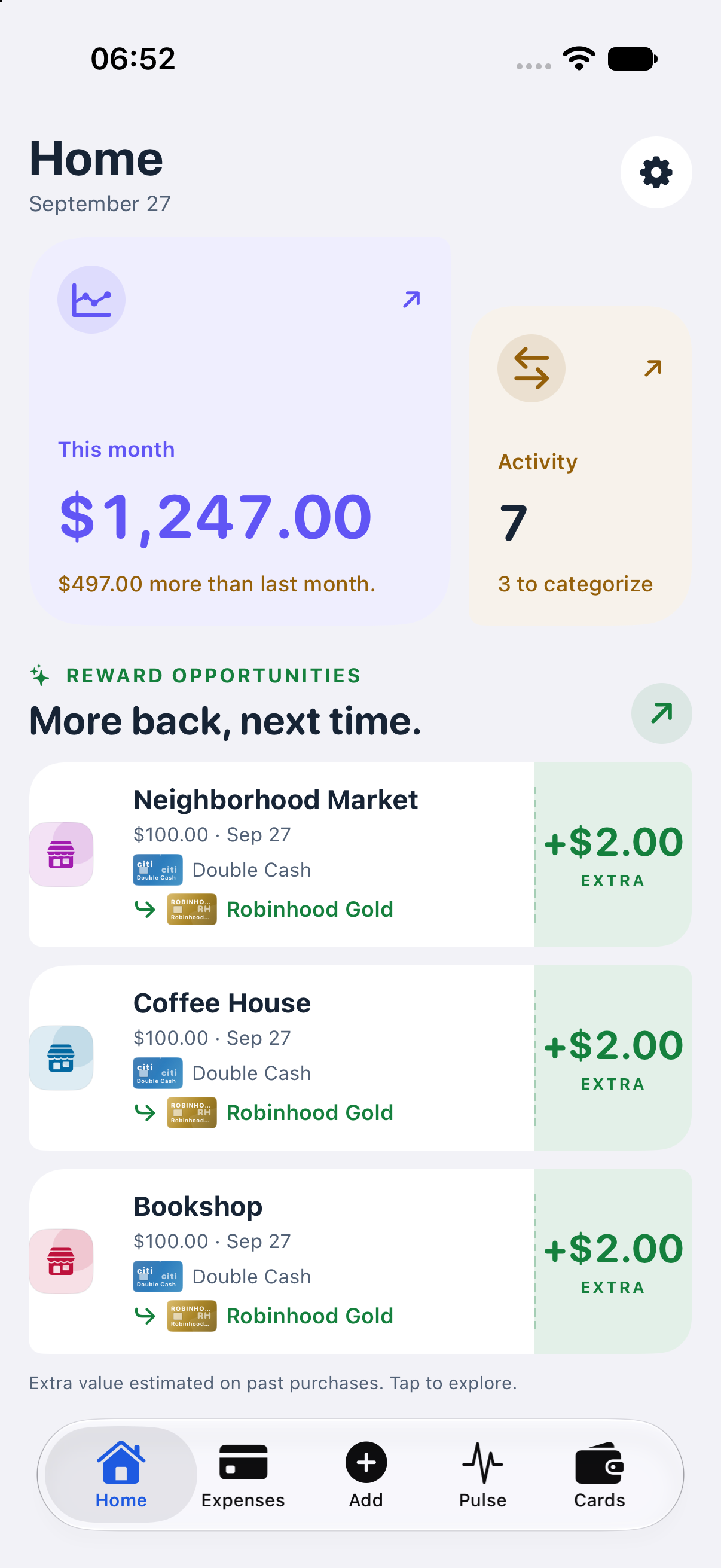
Actual app screen · Example data
For everyday spending and the cards you carry
For people who want to understand their spending and use their cards well, without setting up a detailed budget first.
See net spending and income for your selected period. Refunds reduce spending; transfers and card payments stay out of spending totals.
Compare your month with available history. Pulse brings together spending shifts, everyday rhythms, and standout moments, with transactions you can explore.
Illustrative Pulse summary“A weekend away shaped this month. Everyday groceries stayed close to your usual rhythm.”
Review opportunities from your actual spending. Transaction-based estimates account for known limits and eligibility, and show where more card details are needed.
Explore located purchases on a map and see spending in the area you’re viewing. Search your selected period by merchant, category, notes, account, or amount.
Locations can be approximate. Correct or hide a place without changing your spending total.
Track recurring statement-credit benefits by period. Review matched purchases or mark usage yourself when a benefit needs manual tracking. Transaction matches are estimates of usage, not confirmation that a bank credit has posted.
Import Apple Card transactions through Apple’s FinanceKit, link supported banks through Plaid, or add expenses manually. Review your spending, explore Pulse, and confirm your cards for more useful reward estimates.
BoodgetSpending, context, and card guidance
•••Know what to expect from your first import, your spending history, and your reward estimates.
No. Start with your transactions to see spending, income, and monthly patterns. Boodget focuses on understanding your spending and using your existing cards; it does not require assigning money to budget categories.
Connect supported banks and credit accounts through Plaid, or import Apple Card through FinanceKit. Other cards simply added to Apple Pay do not provide transaction history through this integration. SimpleFIN is also available as an alternative bank source. Plaid and SimpleFIN are used one at a time; Apple Card can sync alongside either.
Boodget checks whether a daily sync is due when you open or return to the app. You can also start a sync yourself. New transactions depend on when your bank and connection provider make them available.
Reward amounts are estimates based on imported transactions, card rules, and the details you have confirmed. Exact card products, eligibility, and available history affect the result. Some benefit usage is inferred from purchases; other benefits need your confirmation. Check your issuer’s statement for actual rewards and credits.
Purchases with an available or matched location. The amount for the visible area includes only located transactions shown on the map, while your period total also includes purchases without a location. Boodget does not request your device’s location permission for this feature.
Boodget is currently in private testing and requires an iPhone running iOS 26 or later. Email to request access. The Home screenshot shows the app with example data. Other diagrams are illustrative; available features may vary with the test build.
Your app database lives on your iPhone. Plaid sync passes through Boodget’s server; categorization and Pulse can send transaction details to the server and AI providers. You choose which accounts to connect. Boodget has no ads or behavioral analytics.
Read the privacy policy
Built for iPhone
Boodget is in private testing for iPhone on iOS 26 or later. Request access to try it with your own spending and share what would make it more useful.
Request access